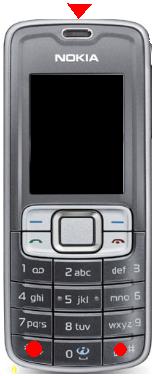
BERIKUT INI ADALAH TIPS TIPS HACK HANDPHONE NOKIA SYMBIAN.......
>>>>Cara hack HP ada dua yaitu cara dengan flashing (advance user) dan cara kedua adalah apa yg akan ana berikan disini yaitu cara sederhana dengan menggunakan aplikasi yg diinstall di HP tersebut. Sekitar satu atau dua tahun yang lalu, hp2 nokia symbian dapat dihack dengan aplikasiHelloOX. namun HelloOX kemudian tidak melakukan update aplikasi tersebut untuk dapat meng-hack hp2 tipe terbaru, mulai dr Nokia 5800 versi terbaru sampai hp2 kelas Symbian^3. Lalu pada masa2 itu semakin banyak dan tenar hack hp dengan cara flashing yang terlebih dulu harus mendownload Firmware hp yg bersangkutan sesuai dengan versi yang sama atau yang terbaru. Selanjutnya beberapa bulan yang lalu, proses hack tanpa flashing dapat dilakukan dengan file installserver dari coderus. Kemudian dikembangkan kembali pada bulan april proses hack tersebut oleh coderus menjadi lebih mudah bagi para pemula hanya dengan beberapa langkah simpel, dan aplikasi hack tersebut adalah JustHackit yang akan ana bahas disini. Saat ini (akhir Mei 2011) HelloOX sudah meng-update aplikasinya ke versi 2.10 untuk diperjual-belikan yang katanya dapat meng-hack semua jenis HP symbian, namun ternyata tim HelloOX menurut penjelasan coderus hanya mengambil teknik engine dari aplikasi JustHackIt yg dibuat oleh coderus tanpa izin, disamping itu setelah ana mencoba sendiri HelloOX terbaru tersebut ternyata tidak dapat meng-hack secara sempurna hp Nokia 6220c ana, yang membuat ana memberi kesimpulan bahwa HelloOX versi 2.10 masih ada bug, maka ana cukupkan untuk memberikan tutorial aplikasi JustHackIt ditulisan ini. Sekedar pendahuluan, berikut ini adalah Daftar Jenis Handphone Nokia Symbian Yang Insya Alloh Support dengan Aplikasi JustHackIt :
S60 3rd Edition 3.0 9.1
Nokia 3250
Nokia 5500 Sport
Nokia E50
Nokia E60
Nokia E61
Nokia E61i
Nokia E62
Nokia E65
Nokia E70
Nokia N71
Nokia N73
Nokia N75
Nokia N77
Nokia N80
Nokia N91
Nokia N91 8GB
Nokia N92
Nokia N93
Nokia N93i
S60 3rd Edition, Feature Pack 1 3.1 9.2
Nokia 5700 XpressMusic
Nokia 6110 Navigator
Nokia 6120 Classic
Nokia 6121 Classic
Nokia 6124 classic
Nokia 6290
Nokia E51
Nokia E63
Nokia E66
Nokia E71
Nokia E90 Communicator
Nokia N76
Nokia N81
Nokia N81 8GB
Nokia N82
Nokia N95
Nokia N95 8GB
S60 3rd Edition, Feature Pack 2 3.2 9.3
Nokia 5320 XpressMusic
Nokia 5630 XpressMusic
Nokia 5730 XpressMusic
Nokia 6210 Navigator
Nokia 6220 Classic
Nokia 6650 fold
Nokia 6710 Navigator
Nokia 6720 Classic
Nokia 6730 Classic
Nokia 6760 Slide
Nokia 6790 Surge
Nokia C5-00
Nokia E5-00
Nokia E52
Nokia E55
Nokia E71x
Nokia E72
Nokia E75
Nokia N78
Nokia N79
Nokia N85
Nokia N86 8MP
Nokia N96
Nokia X5
S60 5th Edition (Corresponds to Symbian^1) 5.0 9.4
Nokia 5228
Nokia 5230
Nokia 5233
Nokia 5235
Nokia 5250
Nokia 5530 XpressMusic
Nokia 5800 XpressMusic
Nokia 5800 Navigation Edition
Nokia C5-03
Nokia C6-00
Nokia N97
Nokia N97 mini
Nokia X6
Symbian^3 5.2 [9] 9.5[10]
Nokia C6-01
Nokia C7-00
Nokia E7-00
Nokia N8
Nokia E6
Nokia X7
TUTORIAL HACK DENGAN APLIKASI JUSTHACKIT :
Didalam aplikasi JustHackIt ada file bernama CertHack_Installer.sis yang merupakan aplikasi untuk hack hp kita. file tersebut adalah aplikasi yang unsigned atau tidak bersertifikat, maka harus disign / diberi sertifikat terlebih dlu untuk dapat diinstall di hp kita. Berikut ini adalah cara memberi sertifikat / sign aplikasi berformat *.sis :
Tahap Signed Aplikasi :
Ana ulangi kembali, bahwa dalam tahap signed aplikasi maka sebelumnya anda harus merequest sertifikat yang telah dibahas di tulisan ini, setelah itu baru lakukan tahap ini. Dalam tahap ini sebenarnya ada beberapa cara, namun ditulisan ini ana akan menjelaskan 2 cara saja : Cara Pertama :
2. Didalam file SignSisTool.zip ada 2 file yaitu : signsis.exe dan SignTool.exe. sedangkan di dalam file JustHackIt.zip ada 2 file juga yaitu : CertHack_Installer.sis dan CertUpdater.sisx. Ekstrak 2 file hasil dunlod tersebut di PC ke dalam satu folder yang sama, misalnya folder “SignSisTool”.
3. Masukkan juga 2 file sertifikat yang telah direquest (ini tutorialnya) kedalam folder yang sama. 4. Jalankan file “SignTool.exe” di PC. Isi isian pada aplikasi tersebut :
- Isian Signsis.exe = pilih file Signsis.exe dalam folder tersebut.
- Isian Unsigned Sis = pilih file CertHack_Installer.sis dalam folder tersebut.
- Isian (cer) = pilih file xxxxxxxx.cer yang didapat dari request certificate dalam folder tersebut.
- Isian (key) = pilih file xxxxxxxx.key yang didapat dari request certificate dalam folder tersebut.
- Isian Sign = Pilih folder dan tuliskan nama file hasil sign terserah anda, ana beri contoh adalah : CertHack_Installer signed.sis
5. Setelah diisi semua isian tersebut, lalu pilih tombol “!Sign It!”, tunggu beberapa saat, maka di folder yang telah kita tentukan diatas tadi akan ada 1 file baru yang berupa file yang telah bersertifikasi atau signed. Sebagai contoh tadi saya telah beri nama : CertHack_Installer signed.sis. Selesai proses Signed/Memberikan Sertifikat pada suatu file aplikasi.
Cara Kedua :
1. Jika aplikasi SignSisTool diatas tidak bisa dibuka di komputer anda, maka anda bisa melakukan cara ini.
3. Ikuti langkah seperti gambar dibawah ini, yaitu : masuk ke tag “Certificate” (1) terus ke “Signed Soft” (2), Download aplikasi FreeSigner.sisx (3) letakkan di drive D, check list di bawah kolom “select” di pilihan hp anda (4), browse letak file FreeSigner.sisx yang tadi di download ke drive D(5), lalu pilih “Submit and Upload” (6), tunggu sebentar karena proses upload dan signed sedang dilakukan. Jika sukses maka akan muncul pesan untuk men-download file FreeSigner.sisx yang telah di-signed, download file tersebut ke dalam komputer anda. Selesai proses Signed/Memberikan Sertifikat pada file FreeSigner.sisx. 4. FreeSigner adalah aplikasi hp seperti halnya SignSisTool di PC yang memiliki fungsi untuk sign aplikasi yang tidak bersertifikat / unsigned. FreeSigner ini yang nantinya akan men-sign fileCertHack_Installer.sis untuk kelanjutan proses hack di hp anda. Adapun cara melakukan proses sign tersebut adalah :
5. Copy isi dari file JustHackIt.zip (2 file: CertHack_Installer.sis dan CertUpdater.sisx) yang tadi sudah di ekstrak ke PC pada poin 2 ke dalam mass memory atau memory card di hp anda, simpan di tempat yang mudah dan diingat oleh anda. Copy juga 2 file sertifikat (file cer dan key) yang telah direquest dan di download di http://www.shoujizu.net/en (tutorial requestnya) ke dalam mass memory atau memory card di hp anda, simpan di tempat yang sama dengan 2 file dari JustHackIt.zip. 6. Install aplikasi FreeSigner ke hp anda. Setelah itu buka aplikasi tersebut dari menu aplikasi.
7. Pilih “Options” – “Settings”
8. Pada isian “Self Sign Cert” pilih file xxxxxxxx.cer yang telah di copy di hp anda pada poin ke 5 diatas. dan pada isian “Self Sign Key” pilih file xxxxxxxx.cer yang telah di copy di hp anda pada poin ke 5 diatas. biarkan pilihan yang lain sesuai default, setelah itu pilih back.
9. Klik “Add Task….”
10. Maka akan muncul File Browser, cari dan pilih file CertHack_Installer.sis yang telah di copy dr PC pada poin ke 5, pilih “Options” – “Add” – lalu pilih “Self Sign Sis” maka akan kembali ke halaman depan FreeSigner.
11. Kemudian pilih “Options” – “Go!”, tunggu sebentar karena proses sign aplikasi sedang berlangsung, sampai done lalu tutup aplikasi FreeSigner.
12. Setelah itu di lokasi yang sama dengan file CertHack_Installer.sis tadi akan bertambah 1 file yang bernama CertHack_Installer_signed.sis hasil dari proses signed diatas. Selesai proses Signed/Memberikan Sertifikat pada file CertHack_Installer.sis untuk bekal proses hack hp dibawah ini.
Tahap Hacking :
1. Install file “CertUpdater.sisx” ke HP anda, terserah bisa melalui PCSuite/OviSuite atau Kirim via Bluetooth atau bisa juga dengan copas melalui Kabel data dengan mode MassStorage lalu buka dari FileManager HP.
2. Setelah proses install selesai, maka install file “CertHack_Installer signed.sis” ke HP anda seperti instalasi pada poin 6.
3. Setelah selesai meng-install kedua aplikasi tersebut, cari hasil instalasinya dengan icon bernama“HackIt!” di menu program hp anda. lalu buka aplikasi tersebut, tunggu sebentar karena proses hack sedang berlangsung, sampai muncul tanda sukses. Dalam proses hack untuk HP S^3 maka akan terinstall aplikasi “FileBrowser” , sedangkan untuk hack HP selain itu akan terinstall aplikasi“RomPatcher”. Bagi yang muncul icon “FileBroser”, maka proses hack sudah selesai dan bisa langsung dinikmati. tapi bagi yang muncul icon “ROMPatcher Plus”, maka buka aplikasi tersebut lalu klik untuk check list di pilihan “Install Server RP+” dan “Open4All RP+” untuk mengaktifkan proses hack, baiknya sekalian pada kedua pilihan tersebut pilih Options – Add to Auto untuk selalu mengaktifkan kondisi hp terhack, karena jika tidak dipilih auto maka setiap HP baru dihidupkan maka kondisinya dalam keadaan belum di check list dan kita harus check list ulang kedua pilihan tersebut untuk dapat melakukan install aplikasi2 unsigned. Tapi kadang di beberapa hp, rom patcher tidak selalu sukses melakukan fitur auto, maka mau tidak mau yaa harus di check setiap hp di restart.
4. Setelah selesai, icon “HackIt” dapat di uninstall, karena sekarang yang diperlukan dalam proses hack telah terinstall dlm hp kita.
5. Selesai, anda telah melakukan proses hack terhadap HP Nokia Syimbian anda. Sekarang anda bisa bebas menginstall ribuan aplikasi2 yang ada di forum2 hp secara bebas sesuai dengan support masing2 hp dan juga memodifikasi hp sesuai dengan selera masing-masing. Sebagai rekomendasi untuk mendownload aplikasi2 HP, anda bisa mengunjungi link dibawah ini :
Untuk “Tahap Signed Aplikasi” baik cara pertama dan cara kedua bisa diterapkan ke setiap aplikasi yang bermasalah sertifikat jika di install ke hp kita, itu berlaku jika hp tidak mau di hack dengan cara di “Tahap Hacking”. Namun jika kita telah melakukan kedua tahap signed dan hack, maka kita tidak perlu untuk melakukan signed ke setiap aplikasi lagi karena sejatinya hp kita telah di hack dan sudah tidak bermasalah dengan sertifikat lagi. Namun kadang ada suatu aplikasi yang tidak mau di install ke hp kita dengan pesan (bahasa inggris) : “Unable to Install. Constrained by the certificate” atau yang sejenis dalam bahasa masing2, maka ini disebabkan aplikasi tersebut telah di signed dengan sertifikat hp lain, krn setiap hp beda sertifikat, maka sertifikat hp tertentu tidak bisa di pakai ke hp lainnya. Cara mengatasi masalah ini adalah :
1. Buka aplikasi “FreeSigner” di hp anda
Klik “Add Task….”
2. Maka akan muncul File Browser, cari dan pilih file *.sis yang bermasalah “unable to install, …..” saat di install, pilih “Options” – “Add” – lalu pilih “Remove Sign” maka akan kembali ke halaman depan FreeSigner.
3. Kemudian pilih “Options” – “Go!”, tunggu sebentar karena proses sign aplikasi sedang berlangsung, sampai done lalu tutup aplikasi FreeSigner.
4. Setelah itu di lokasi yang sama dengan file *.sis tadi akan bertambah 1 file nama yang sama dengan tambahan dibelakang nama file xxxxx_unsigned.sis hasil dari proses unsigned diatas. Selesai proses melepas Sertifikat pada file *.sis tersebut. Selanjutnya anda bisa melakukan proses ulang install file itu tanpa ada masalah “Unable to Install. Constrained by the certificate”.
SELAMAT MENCOBA YA SEMOGA BERHASIL......
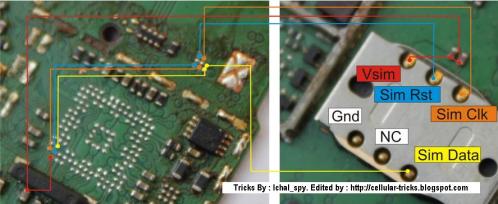

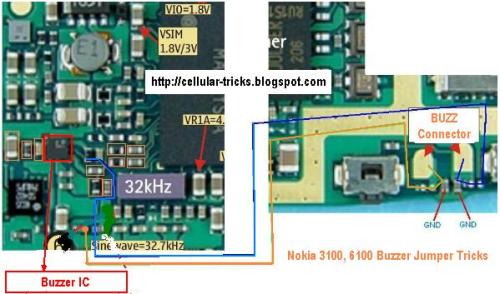
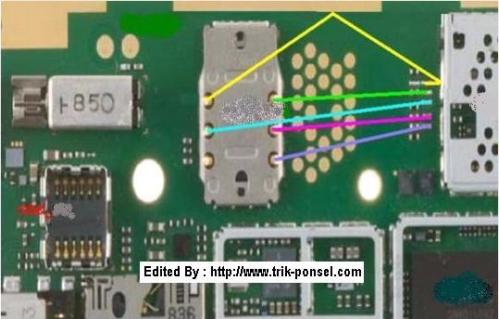
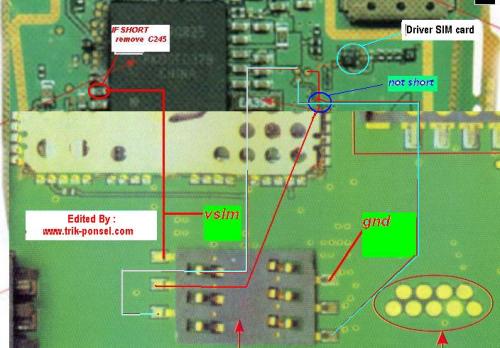 Gambar : Nokia 6600 Jalur SIM Card


 Akan tetapi biasanya tidak ada yang menjual komponen ini, kita harus ambil dari bangkai-bangkai HP yang rusak untuk di kanibal. Gak perlu harus N95 juga, akan tetapi semua tipe HP tidak masalah yang penting nilai resistansi-nya sama. Semoga berhasil. Warning.. Tricks ini ditujukan untuk professional dalam bidang Elektronika, tapi yang ingin belajar silahkan dengan resiko ditanggung sendiri-sendiri. Maju terus, jangan pernah berhenti belajar dan belajar..